Wednesday, July 23, 2008

Microspotting


So, working at Microsoft this summer has been nothing short of awesome. Lots of cool people, cool projects, and cool stuff. Lots of cool stuff to do, to see, to experience, to keep. It's really been a great summer here in Redmond.

I came across a website that is pretty awesome, too. Microspotting. It's "like the paparazzi, but for geeks." I think it's pretty neat. There is a lot of cool information and spotlights on neat people that people like myself find interesting. They also embrace that ominous persona that has precedes the giant corporation, that which gives a likening of Bill Gates to Darth Vader or Darth Sidious. The "Rockin' the empire" campaign is genius. It totally downplays all of the negative stereotypes of Microsoft in a single phrase. When I first got here, I was in for a huge surprise in that area, too. It wasn't all uptight with deadlines, deadlines, deadlines! People have fun here, and really know how to balance their work. (At least in Research, I can't speak for the product groups.) But anyway, if you've ever considered a position at Microsoft, delay no longer, check out the website and find a way to assimilate into the borg, er the empire, errr Microsoft. =D I'm a 'Softie and lovin' it.

Wednesday, April 23, 2008

My new tablet PC

So I got a new tablet PC! It's freaking sweet. I just wrote this post with the handwriting recognition engine in Word 2007.

Monday, March 05, 2007

Orb

Thursday, February 08, 2007

Thesaurus.com : Most Worthless Reference Site


EVER. This site, once useful for finding great synonyms to shove into papers produced for college professors in sweat shop conditions, now reduced to a site that continuously gives me the phrase "hot poop" as a synonym for "information". I'm not sure that (a) word(s) taken from a skinny white guy posing as a cool rapper in front of his friends constitutes as a good word (choice) substitution in a college level paper... or any situation for that matter. I just don't get it... not a single good suggestion. Try it yourself. They don't seem to be in any hurry to fix these results from the Roget's New Millennium™ Thesaurus for which I can easily Cite This Source. Who cares if the word sucks? "Poop" wasn't the only word completely useless on that specific page (trust me "information" isn't the only word). Although "poop" was on the page 3 times, 95.6% of the other words made no sense and did not help. This site has seriously gone down the tubes.

Wednesday, February 07, 2007

Netgear SC101 : Satan takes the form of a toaster


I bought a Netgear SC101 on Black Friday of '05. Sounded like a pretty sweet setup to me, a NAS with 2 HDDs for 100$, can't beat that! Turns out, I was very much mistaken. At first, it seemed alright, I put a hard drive in, and installed the software. Special software to control the read/write. Sounds sketchy, but I'm sure NETGEAR/Zetera did their homework, is what I told myself. Come to find out, NETGEAR failed the course on making a good NAS. They just made a crappy one and put their name on it. The fact that it requires special software to be installed on *only* Windows PCs is a drag, instead of using some built-in SMB sharing method. The setup program was poor, and it seemed that somehow, everything was held together with duct-tape. Amazingly, it worked.

After realizing there was no point to this device, I scrapped it and put it on the shelf for a good year, before I got it back out and shoved 2 400GB Seagate 16MB 133's in. I proceeded to get it working, and backed up a bunch of my information onto it. I figured, it would be horrible for continuous use, but perhaps using it as a backup device isn't a bad idea. Wrong. A couple reformats of my computer later (trying out Windows Vista Ultimate) I'm back with Windows XP MCE (the same as before). I tried connecting the SC101 back up last night, installing the software, etc. My router gave it the normal IP addresses, everything looked as it should there, and the software even recognized that I had the two HDDs in there and that they had 1 drive partition and 0 MB free space. However, the darn thing said there were NO DRIVES TO ATTACH!

After scouring the Internet to try and find a solution, and calling NETGEAR's worthless support number. I finally got it fixed. At first I looked on the Netgear support site and called. They said that: ~"the SC101 wasn't supported on MCE (MCE is essentially XP Pro with extra features), they said they'd have to check, hold, thanks for holding, I'm still not sure, hold, thanks, but we'll have to have someone call you back in 1-2 hours (5pm'oclock is the current time)"~. They confirmed my phone number and it seemed promising, but it wasn't until 9:30am the next day that I got this message while in class: listen I think he said "Geevn a cold bach" like 10 times. Even if I did answer the call, from what I've read online, I would have gotten more help and been able to understand better a signing monkey on the phone.
These are the websites that helped me solve my problem last night:
SITES TO BE LISTED LATER
http://blog.forret.com/2006/07/netgear-sc-101-urgent-support-required/
- Blog with more information like this.
http://kbserver.netgear.com/kb_web_files/n101605.asp
- Get 'ut_full.exe' here (required for reparation)

What ended up fixing my unit is this:
  1. Use Utility 1.5.6 NOT 1.5.7 I said DON'T use 1.5.7
    • If you've installed 1.5.7, uninstall, reboot, install 1.5.6.
  2. Make sure the password for the device is the DEFAULT PASSWORD 'password'.
    • Yes, the default password is 'password'.
    • Make this the administrator password for both drives (yes each drive is unique) and for all the partitions 'password'.
    • If you only have one of whatever, just ignore the 's' and set the default password for however many drives/partitions you do have.
  3. You will need to run two commands with the 'ut_full.exe' for each partition to attach after running 'ut_full.exe listall'. Get the ROOT_IP and PART_IP from the set of information in this picture (The section to the top is what the ROOT information will always look like, just 3 lines. The section to the bottom will contain at least 2 lines, more if you have more than one partition.), make sure it matches up correctly for the partition you are trying to repair:
    1. 'ut_full.exe ROOT_IP PART_IP getpart password'
      • Note the number set in the middle either 01 00 01 or 02 00 02
        • 02 00 02 - For a MIRRORED DRIVE
        • 01 00 01 - For a NON-MIRRORED DRIVE
        • If your values match neither of these, use the values that it should have for the next step.
      • Note also the number at the end (THE LAST SET) 01, 02, ..., 18, 1C, ...
    2. 'ut_full.exe newattr ROOT_IP PART_IP password'
      • Type in:
        • 00 00 00 00 00 00 00 00 0X 00 0X 00 00 00 0A XX
        • Yes, use the numbers from the 1st step to fill in the X's.
        • Essentially all you are doing, is hopefully just changing the value before the last to '0A'.
  4. Try resetting the device by holding down the reset button on the back for more that 10sec.
  5. Try uninstalling the software/reinstalling.
  6. Try attaching.
It took me several tries and a few different techniques to get my drives working, but they are A-OK, now. I fully attribute their working order to the steps above, so if you are having trouble with yours, try it out, and let me know if it helps.

If the 'ut_full.exe' commands are not working, make sure you followed the directions. If it just won't work, period... Then you may have a problem that is only fixable by tossing the thing in the rubbish. I apologize if this wasn't what you wanted to hear.

What is my final opinion of this product?
Do NOT buy the SC 101 from Netgear. You can find much better and more viable alternatives elsewhere.

Final opinion of this for Google is:

DO NOT BUY THE Netgear SC 101 SC101
do not buy the netgear sc101 sc 101
horrible un-reliable lose data non-working broken bad stay away

Monday, January 29, 2007

The Zen Clock

Like those seen on http://www.now-zen.com/, you can create your own Zen-Alarm Clock with your PC for free! I'm sure that you've heard about them. I've been wanting to do this for a while to see if the Zen clock really does make a difference. You can try it for yourself, as I have timed the sounds to the web site's specifications for the optimal ultimate wakeup call. If this works, I may buy the real thing.

Download the .ogg files and the m3u for making your own Zen Clock. I added a task into the Task Scheduler so that my alarm starts going off at the exact time so that I am awake by 8. Try it yourself, here are the files:
  • ZenClock5sec.ogg - Set of 3 tones, 5 second separated (15sec)
  • ZenClockTimed.ogg - The Variably timed tone file
  • ZenClockOgg.m3u - Standard Play list File
  • ZenClockOgg.xml - Vista Task Scheduler Task XML File (setup for an 8am wakeup)
    • This task launches Windows Media Player with the m3u above. Of course, you'll need to either edit the XML or load it into Task Scheduler and edit the argument to have it point to the location of your m3u.
Make sure your media player supports ogg audio files. If not, just convert them and use find/replace to change the ogg's in the m3u to mp3 or whatever. Ogg was just the smallest file size for uploading.

**UPDATES:
Jan 30, 2007 - Last night, I tried my Zen Alarm. It worked almost as advertised. While, I think I woke up after the first tone (perhaps due to the volume), I was still able to wake up, less groggy than normal AND I can remember most (?) of my dreams from last night. I say, overall, it was definitely successful and this will be my alarm clock permanently. I'll try finding the sweet spot for the volume.
Feb 2, 2007 - Media Player freaked out this morning and kept repeating the bell sound in about .5 sec intervals from the beginning. I woke up groggy and tired. I got the same amount of sleep as before. This shows that the placebo effect is not in place as I expected to be woken up by the gentle alarm, but instead what I got was essentially, a regular annoying alarm clock.

If you've had success, post your results in the comments.

Sunday, January 28, 2007

Link to JAVA MIDlet Applications

After looking all over the internet to figure out how to make a shortcut directly to a JAVA MIDlet on my Pocket PC for the Start Menu, I finally compiled this for your enjoyment:
  • The "right-click" in explorer didn't give me the option to create a shortcut.
  • I didn't find out 'till after the fact, that you have to "Show All Files" for the "jmm.exe" file to show up in "\Windows\". Oh well. Doesn't matter.
  • I'm pretty sure this requires "Total Commander" Google it, it's free and easy.
  • You should already have launched your Application once from MIDlet manager.
  • Some apps, like Gmail, must already be running to work from this shortcut.
To create a Start Menu or Programs Shortcut to your favorite JAVA application:
  1. Open up the MIDlet manager however you do that.
  2. "Hold tap" to open the context menu.
  3. Press "A" or click "About".
  4. Note the name of the Vendor and Name that appears.
    • In my case the Vendor is "Google" and the name is "Gmail" for the Gmail Application
    • WRITE IT DOWN... You need it in a minute...
    • Yes, it's case sensitive.
  5. From here, there are three options, but they both end in the same place, so start at step 3.
    1. Use your Pocket PC to create the "shortcut":
      1. Create a shortcut to "\Windows\jmm.exe" by...
      2. Go to "\Windows" in "File Explorer".
      3. "Hold tap" on "jmm.exe".
      4. Select "Copy".
      5. Goto "\Windows\Start Menu".
      6. "Hold tap" and select "Paste".
      7. This supposedly creates a shortcut. I didn't do it this way, so I don't know.
    2. Use your Non-Pocket PC to create the shortcut:
      1. Connect with Active Sync.
      2. Right click in "\Windows\Start Menu" and click "Create Shortcut".
      3. My computer (Windows Vista) did not give me this option, so I don't know.
        • The best and easiest way to do it is below.
    3. Create the shortcut in one swoop with "Total Commander":
      1. Use TC to locate "\Windows\Start Menu".
      2. Copy and paste one of the other shortcuts located there.
        • I used Media Player
      3. Select your newly created shortcut and rename it to whatever you desire.
        • In my case, I chose "Gmail".
      4. With your new shortcut selected, click on the notepad icon at the bottom to open the file with TC's built-in text editor.
        • You should see (if you used Media Player as the source to copy):
        • 13#:WMPLAYER?:mediaplayerapp
      5. Delete that line.
      6. Type (/Transcribe/Letter Recognize/Tap in):
        • 48#"\Windows\jmm.exe" -r"","",""
        • 48#"\Windows\jmm.exe" -r"Gmail","Google","Gmail"
        • To pick a special icon, you can follow up this line with:
          • "?file.ext,index" where "file.ext" is a file containing icons, and "index" is the index of the icon within that file.
          • For example: "...CALENDAR?outres.dll,-10002"
      7. Click "OK" to save and wham, bam, check out that Start Menu.
  6. Click to launch.

Monday, October 16, 2006

Geek Squad... Errr.. Geek Fraud

I'm a college student as you all know, and today, in my business ethics class, we had a presentation from a student who happens to be an employee for Geek Squid.. that adolescent computer tech wannabe taskforce that Best Bought has on staff. I know this, because he pretended to know what we was talking about when our professor couldn't get the projector working and after unsuccessfully jiggling wires, returned to his seat. He had, however, prefaced his "work" with "I work for the Geek Squid... yadda yadda". Anyways, so you may say, "So what, he couldn't figure out a proprietary projection system at your university... that doesn't mean that the Squid is a Sqam..." I would agree with you, aside from him acting like a pompous prick, I wouldn't have given the situation of him a second thought... until today. He just finished his presentation, and he brought his own computer to hook up to the projector (probably loaded with spyware and porn dialers, but far from the point). Attempting to get his laptop working with the system, he grabbed the D-SUB15 VGA patch cable, held it in the air before connecting it and asked our professor, "Does this get sound too?" Wow, here's a winner. Any competent computer user that has ever done any kind of cable connecting knows the answer to that question. I definitely do not want this breed anywhere close to my computer or the computer of someone I love.

Tuesday, August 01, 2006

How to restore your music from your iPod with iTunes

There are many articles about how to restore music from your iPod using 3rd party software, but I've never seen an article detailing how to do it with the official iTunes software.
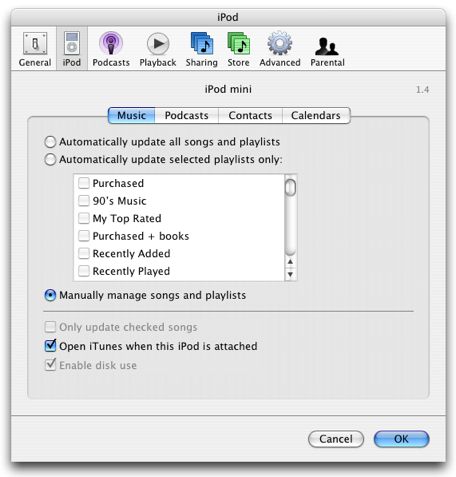
  1. Make sure your iPod is set to "Manual Update" in iTunes before connecting it to a new install of iTunes. Otherwise, iTunes will begin "syncing" the two (deleting the music from your iPod).
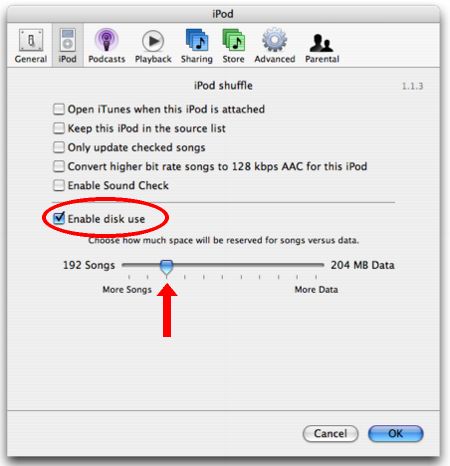
  2. Make sure your iPod is configured for disk usage by putting it in "Disk Mode". You can use the "Enable disk usage" checkbox in iTunes or do it manually.
    iPod/iPod Mini

    iPod Shuffle
  3. Set iTunes to also copy songs added to your library.
  4. Set iTunes to organize your library if you want (suggested).
  5. Next, change your Windows Explorer in Windows XP options so that you are able to view hidden files and folders.
    Note: This step works for a variety of different operating systems, however, I do not have a different system to give instructions for. Just change your File Browser's view settings to show hidden files.
    1. On the Tools menu in Windows Explorer, click Folder Options.
    2. Click the View tab.
    3. Under Hidden files and folders, click Show hidden files and folders.
  6. Make sure your iPod is connected to your computer. Navigate to the drive letter that is assigned to your iPod (i.e. X:).
    • Goto: X:\iPod_Control\Music
    • Press {CTRL+A} to select all of the folders that you see here.
    • Click and drag the selection and drop it into iTunes. iTunes will then begin copying your music into your music library and renaming them according to the ID3 tags that they hold.
  7. That's it! In the end you get your music from your iPod properly named and organized in your new iTunes installation. Enjoy.

Thursday, July 20, 2006

Dell Tech Support from an Optiplex-Optimist

This blog was written in response to another's post about the horrible technical support that Dell provides. Written below is my expert opinion, as I work with computers for a living. Also, to those skeptics, who say that I got special treatment because of where I work, I say this, "There are plenty of computer illiterate (read: "stupid") people out here that have problems with their Dells everyday, and there is no way, they (Dell) would ever be able to know people like that or someone like me by our work location." Dell was able to deduce my level of skill and adapt what type of technical support I needed.
I work at the Oak Ridge National Laboratory, and we have a contract with Dell, where we may purchase their machines at a slighty lower cost. I assume, however, that we call the same tech-support number as everyone else and have the same on-line support as you do as well (I just grabbed them off the support web-site, so by assume, I mean "I know"). Recently, I had a problem with one of our machines not turning on and after submitting the problem via their online support website, I was greeted by someone who seemed to be American (in speech) and we quickly diagnosed the problem. Since we decided that the issue was either in the motherboard or PSU, and at the time I couldn't test either to determine which was at fault, she promptly shipped both items to me, overnight (via DHL) and included a return mailing sticker. I had the PSU replaced within 10 minutes of the package's arrival and sent the replacement motherboard back with the broken PSU, no problem.

Most people only complain about Dell's tech support, but rarely have I heard good things, I just wanted to share my personal experience with their tech support. However, my overall opinion is subject to change at the next time I need to call on them.
Here is the entire transcript (ver batem) copied from the email that they conveniently send out after an online tech session. Calling tech support is so 20th century...
This is an automated email sent from Dell Chat. The following information is a log of your session. Please save the log for your records.
Your session ID for this incident is XXXXXXX.
Time Details
06/01/2006 12:19:53PM Session Started with Agent (RTS "JANE DOE")
06/01/2006 12:20:08PM Agent (RTS Jane Doe): "Thank you for contacting Dell Hardware Warranty Chat Support. Please give me 1-2 minutes to retrieve your service tag information"
06/01/2006 12:20:42PM Wes Alvaro: "Hi, My Optiplex GX260 isn't turning on."
06/01/2006 12:21:16PM Agent (RTS Jane Doe): "One moment please."
06/01/2006 12:22:33PM Agent (RTS Jane Doe): "Thank you. May I also have your phone number and e-mail address?"
06/01/2006 12:23:05PM Wes Alvaro: "865 xxx xxxx xxxxxxxx@ornl.gov"
06/01/2006 12:23:40PM Agent (RTS Jane Doe): "Is this a new or existing case?"
06/01/2006 12:24:30PM Wes Alvaro: "New."
06/01/2006 12:24:49PM Wes Alvaro: "The power button just glows orange, I assume it's a motherboard or power supply issue."
06/01/2006 12:25:30PM Agent (RTS Jane Doe): "I am sorry for the inconvience you have had, Wes.PLease give me a moment."
06/01/2006 12:28:37PM Agent (RTS Jane Doe): "Thanks for waiting"
06/01/2006 12:30:33PM Wes Alvaro: "no problem"
06/01/2006 12:32:49PM Agent (RTS Jane Doe): "Have you tried the normal troubleshooting FAQ for when the computer does not turn on?"
06/01/2006 12:33:37PM Wes Alvaro: "Yes, I have the machine just ceases to function at all, no fans, no lights, no noise, just an orange glow from the power button is all I can get from it."
06/01/2006 12:34:25PM Agent (RTS Jane Doe): "Have you tried starting the computer without the ram installed?"
06/01/2006 12:34:55PMWes Alvaro: "Yes, I have done all of the normal troubleshooting techniques."
06/01/2006 12:35:44PM Agent (RTS Jane Doe): "I believe it may be the power supply. Do you have a spare power supply that you can test?"
06/01/2006 12:35:50PM Wes Alvaro: "Not at this time, I don't have any spare ones taht I can try, no"
06/01/2006 12:36:03PM Agent (RTS Jane Doe): "In that case, I can send you both a replacement motherboard and powre supply."
06/01/2006 12:36:18PM Agent (RTS Jane Doe): "Once you receive the parts, will you be needing a technician to install them?"
06/01/2006 12:36:26PM Wes Alvaro: "No, I will be able to handle the install."
06/01/2006 12:37:38PM Agent (RTS Jane Doe): "Alright, then, you can mail the spare parts back when you are done."
06/01/2006 12:38:37PM Agent (RTS Jane Doe): "What is you mailing address?"

...
06/01/2006 12:41:55PMAgent (RTS Jane Doe): "Is there anything else I can help you with today, Wes?
06/01/2006 12:42:55PM Wes Alvaro: "No, that's it, thank you"
If you require further assistance, please visit us at support.dell.com

Tuesday, April 04, 2006

My rating

Modern, Cool Nerd
73 % Nerd, 56% Geek, 47% Dork
Take the test.

Sunday, April 02, 2006

Hurricane in K-Town


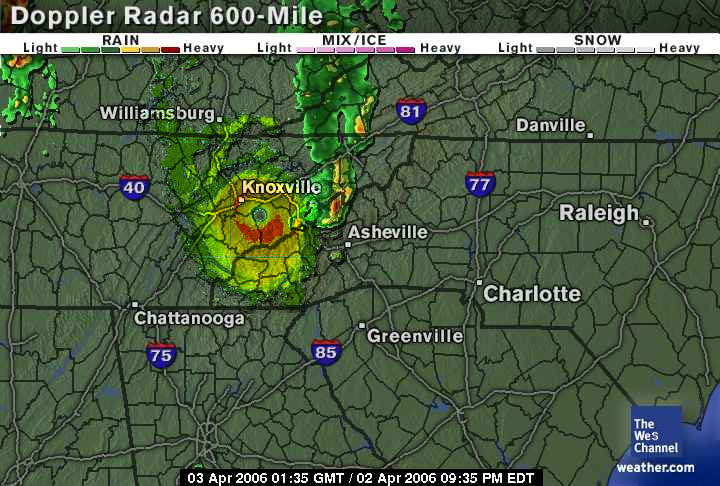
Wow. That was a storm. So, while I and the rest of those in Clarence Brown Theatre were subjected to the horror of the movie "Brokeback Mountain", the rest of Knoxville faced a crazy hurricane of a storm. To the right is an artist's rendition (mine) of the storm.

First of all, I think 'twas the rest of Knoxville that got off easy.
I don't mean to step on any feet and I think that because of the "nature" of this film, that doing so is inevitable, but America is a free country and I can say what I like. If you don't like it, then, I'm sorry, that's just the way I think. Brokeback Mountain gets a big one star out of 10 and I strip it of all awards it has received. And it only gets that because of the filming. The director got in a few good camera angles and that was the saving grace from this movie receiving a big goose egg. It angers me greatly when movies such as this one sweep awards just because of its eccentric theme and "nature". That's really all I can call it. Had this movie starred completely straight individuals, the critics would have agreed. Google's collective rating was a 4.6/5.0 which I believe is completely bollocks. Some reviewers gave it 5/5, that's just ludicrous. Some referred to it as "a masterpiece" or "more than a gay movie". Those people are liars. The only reason this movie has received any publicity at all is because of its questionable content. The acting was fine, but Heath's voice sounded like he was holding rocks in his jaws. The music was so overbearing, that by the end of the movie, I wanted to choke that guitar player. I hope he was doing it for free, at least that would explain it. Although the movie's real running time was around 2 hours, it was soooo slow during 98% of it, it felt as if it would be morning when we got out. Waiting for any kind of actual content from the beginning of the movie felt like waiting in line at the DMV... endless, and since there really wasn't anything I in the movie, they had to waste time with empty scenes and way too visual "encounters" between the main characters. One scene, apparently showing the low budget (?) of the film has on of the set microphones fall into the frame? wtf? How did this POS movie win anything? Was it the "hot" stars? The nudity? The adultery? The horrible parenting? The domestic verbal and physical abuse? The gay encounters? I'm baffled by this. Spoiler:: In the end, Jake Gyllenhaal's character is murdered and covered up by the local Texans and that's when I started to rejoice... soon it would be over. :: All in all, the movie was about a complete lack of morals and how in the end, everything is alright, as long as you don't get caught. Hardly values to relay no matter what kind of movie. There wasn't any happy ending and there wasn't really any entertainment in between the credits and the title. Take it from me and don't waste your time with this horrible utter embarrassment to the MPAA. "I wish I knew how to quit you." I wish I knew how to forget you [the movie].

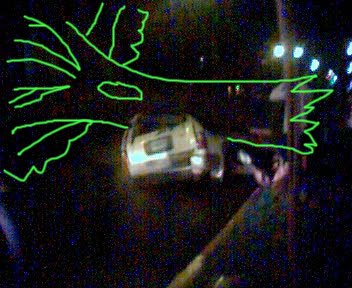
Back to the more pressing matter: The hurricane that hit Knoxville. Ok... so it wasn't a hurricane, but it was crazy. Trashcans were strewn everywhere, trash, rain, puddles, thunder, lightning, torrential downpours... you name it. I just wish I had been out of that theatre to see it. If I'd a known it was that good, I would have taken an extremely extended bathroom break to see it. Perhaps the worst damage from the storm is in the picture to the left. I wish I had had more than my phone camera to get a picture of it, but... oh well. I have drawn in the tree that is invisible in the picture. It really doesn't do the sight justice. It was so bad, that my UPS had to shut down my computer! Now you KNOW it was crazy. lol. I love thunderstorms.

Saturday, April 01, 2006

Poodle Ball

Why TiVo When You Can Steevo?

If you haven't heard about the new craze, there is a huge fuss in the geek world with creating appliances that can view and record television. We used to call these TV/VCR combos, but no longer are they the topic of discussion. I'm talking about PVR, Personal Video Recorders, and they are becoming increasingly popular with the help of TiVo and other retail PVR/DRV/HTPC/Whatever new acronym they'll think up.
These pieces of equipment that you can pick up at your local BigBuy or ComUSA boast 40+ hours of digital recording from your satelite or cable and the ability to do X or Y. What they try to shove under the rug is the fact that they not only have a pretty pricetag with a large dollar figure, but that there is a monthly fee for their spectacular service (sarcastic).
Now, don't get me wrong, these devices are really neat and if you have the money, then grab you one and have fun. But for those like me (cheap, project-oriented, and tech-savvy), or those with the money and wanting to put their idle hands to work, there is another option.
What would you say if I told you that you could create your own "TiVo" for the same cost with better features and no monthly subscriptions? I bet you're saying "Wow, tell me more, Wes.", well, alright, I will.
The easiest way is also the not-so-much-fun way. You can easily buy a TV Tuner Card from an electronics store, throw it in an empty PCI and wam-bam-Bob's your uncle, you can watch and record TV on your current PC!
That may not be what you want. Especially if you are using that computer for other things (gaming, work, etc) plus, you'll need your "Steevo" to be on almost all the time to catch that late-night Dukes-Of-Hazzard Episode you missed. I guess if this isn't an issue for you and you like the idea, check out the PVR cards from Hauppauge. (They're at the top of the market at time of writing.)
If you want to get a little more in-depth with your DVR, digital video recorder, endeavour, then let's build one from scratch! It's simple. Here's what you'll need: A computer and a TV Tuner Card. Now, I now, that's vague, but here's where you're options come in. You can build any kind of computer you want past minimum requirements and you're good to go, but you may want go a certain route. You can get a small box to go along side your current living room e-vices or get a clunky large, 3-tuner box for multiple recording and shove it in a closet. It's up to you. XPC cases offer a small footprint and usually come with motherboards and accessories, so all you buy are drives (optical, magnetic), a processor, memory, TV Tuner card, and maybe a video card (some have onboard which may be sufficient). You just slap all the pieces together, install the software and bang, you're done.
Now... what software do you choose? For n00bies, go with the tried and true for you and install Windows XP Media Center Edition. It's 110$ for Windows XPPro and MCE (cheaper than XP Pro, I don't understand that) and it's got plenty of features for you. For others, you may choose to go the free route with Linux and MythTV or Freevo. Here is a guide to building a freevo computer with SlackWare Linux. There are also instructions for Fedora and MythTV.
Whichever way you go, make sure that your TV-Tuner is compatible! Look for the "Windows MCE 2005 Compliant" sticker, or that bttv or IVTV support your card for linux. It's makes the setup much easier and in most cases, possible! A page on the MythTV wiki prints a list of card selections for bttv.

I'll post more specific information as I delve into the world of PVR and try out the Linux side for myself. The Windows part really doesn't need any explanation. Just take their tour. It's really all plug and play n00b proof.

Friday, March 31, 2006

Ten reasons why Geeks make good friends - Revised

  1. I love the innocence of Geeks. The Geeks weren't the ones face down in a pool of their own vomit for most of their high school years. A rough Friday night for them as a teenager was when the computer crashed and they spent all night trying to fix it. I don't know a single Geek who was too drunk the following morning to take their SATs. In my defense, that was the first time I had ever had 151 Bacardi.
  2. My friend, Ellie, was in her early 20's and had never been drunk before. We had a huge party and she decided that was going to be the night. Around 10 pm I walked into my bathroom to see her hugging the toilet, a guy holding her hair back and her heaving like she was trying to get it out of her feet. She looked up at me as I walked into the bathroom, tears running down her face and said "Am I doing this right?" I wanted to laugh and cry at the same time because she looked so pathetic. She was completely consumed with worrying that she was worshiping The Porcelain God correctly. Now I'm not saying the Geeks don't know how to party, they just figure it out a hell of of a lot later than the rest of us.
  3. Geeks are smart and funny. They get the Dennis Miller jokes. I suppose I must have some sort of inner Geek, because it wasn't until I started hanging out with the Geeks, that people really started getting my jokes. Occasionally people would get it, but not always. Once I was watching European Vacation in the theater, and the girl looks at a sausage being served and said "I miss Jack...." I burst out laughing but it took the rest of the theater about 15 seconds to catch up with me. My friend Andrew was so embarassed that he got up and moved about 5 seats away from me which caused the whole theater to start laughing again. Honestly, how did they miss that joke?
  4. Geeks are always straight foward and up front about things. They make good friends because they are loyal and won't stab you in the back. It doesn't occur to them. It's not logical.
  5. I like the fact that Geeks have no pretense of social norms. They will invite you over to their house to play board games or D&D, never realizing the rest of the world plays poker or drinks.
  6. The Geeks will look up to you for coolness. They will listen to non-nerds. If you say, "Don't wear that, it's really geeky looking" it will give them pause. Course that won't work if you're talking about strapping the latest digital camera to their waist, but if it's not techincal, they'll listen.
  7. Geeks will love your cooking. I have no idea why. I don't know if they're secretly starving to death or if their inability to cook causes them to always be starving but they will wolf down just about anything. And love it.
  8. Geeks are an accepting bunch of folks. They will accept your weird friends, your family, whoever. No need to be embarassed, they've pretty much seen it all.
  9. Geeks pay attention to detail. They're kind of an anal retentive-OCD type bunch. If my socks don't match, Ellie will notice. If I've got a pimple, Ellie will notice. If the cabinets in my kitchen are open, Ellie will close them. This isn't a bad thing, because if you've got something in your teeth, the female geek will tell you. The male geek will assume he has a chunk too, shrug and go on with his day.
  10. You never, ever have to worry that should you find yourself in the position of having to do something athletic, that you will look like a dork in front of your Geek friends. They've cornered the market on that. If they're not the ones who are hideously uncoordinated, then they are either working with, dating, married to or friends with a number of them who are.

Ten Reasons Why You Should Date a Geek

  1. He can fix your computer. There I said it. Do you really need another reason? He is not a bum. He has useful skills that can make your life (at least the part that is spent on the computer, and let's face it, that is where we all spent most of our time any way) run smooth. Not enough? OK, here's number two.
  2. He has friends who can fix your computer. So now you are in a relationship and he knows he's got you and doesn't feel like he needs to jump every time you call. All of a sudden he is too busy for you? He has work to do and can't get there fast enough? No problem. Call one of his buddies. They'd love to help out. Geeks are the most helpful friends you'll ever make.
  3. Not a computer person? OK, here's the killer. He can also hook up the TV, connect the DVD player and Tivo your favorite programs. He'll also hook you up with the sweetest sound system you've ever heard. It would be like angels singing to you.
  4. Looking further for another reason? Yes, you guessed it. He has friends who can hook up the TV, connect the DVD player, etc. etc. etc.
  5. And it gets better: Not only can he fix your computer and DVD player, he can do the same for your friends. All of a sudden your social life will pick up. Your phone won't stop ringing. Dinner invitations come up every night of the week. You'll be as popular as if you owned a truck and you don't even have to help anyone move.
  6. Sigh... you really want more reasons to date a geek? Fine. Here's one for your vanity. He'll make you shine every where you go. No matter how clumsy your sense of style, no matter how awkward your social skills, you'll be a fashion star and a classy diplomat next to your geek. He'll make you look so good; you'll fall in love with yourself.
  7. So you are not into computers, TVs and DVDs and you don't care about being popular and fashionable. What about the newest techie gadgets? Do you like cell phones, digital cameras, camcorders, or MP3 players? Forget bling bling. Let me tell you girlfriend, you are going to be a proud owner of the latest gadgets if you ever decide to date a geek. Your cell phone will not only have your best friends' number on speed dial, it would also be able to take pictures, make movies and even do your nails. Your sleek, sexy, and very small digital camera will take pictures that will put Ansel Adams to shame and your brand new, top of the line MP3 player will make all the heads turn your way.
  8. Not satisfied yet? Ok, I hear you. You are saying gadgets and toys are fun, but they won't keep me warm in the middle of the night, if you know what I mean. Well, I didn't think I would have to tell you this, but I guess you are going to make me spell it out for you. Here's the deal, sweet and simple: Your geek will worship the ground you walk on. He'll be so happy that a pretty girl like you paid attention to him that he'll be at your feet. He'll adore you as if you were his queen. In his arms, you'll feel like you are at the top of the world. Believe me, I know what I am talking about.
  9. I know I got your attention now, but wait it gets better. He won't cheat on you either. You don't believe me? Here's a test. Place the sexiest woman on earth in a room with a geek, say Angelina Jolie in a Victoria Secret sexy lingerie. At the other corner of the room, place the latest model of some computer or other. I am willing to bet my bottom dollar that your geek would want to play with that computer much more than getting to know Angelina Jolie. In fact, he might not even see her if the computer is on and connected to the Internet. C'mon he has to check his email, surf the web and blog about the fact that he is in a room with Angelina Jolie ;)
  10. Ok, reason number ten. Did I mention he can fix your computer???

Ten reasons it isn't always easy being married to a Geek - Revised

  1. NERDS ABOUND. You will never ever miss another episode, movie, museum or function relating to Star Wars, Star Trek, Lord of the Rings, or other such geek fests. The references alone to such nerdities will kill you. I don't care about Cling-ons, Tantoieen, and have been dubbed by Steve and his friends as "Ring Hater." It should be against the law.
  2. MEMORY. Our minds are complete and utter LINT TRAPS. Not steel traps, LINT TRAPS. We capture all kinds of useless crap and store it up there. I can remember all the characters in a book he read when he was 8 years old but he can only remember 2 of the 3 things he was supposed to get at the grocery store. I can remember the date of Nolan Ryan's no hitter, but I can't remember our anniversary. I remember every battle of WWII, but can't remember what I gave you for a wedding present.
  3. VOCABULARY. Let me call this the Dictionary Effect. He can't use normal words that the rest of us use. He says he's going to ping somebody. In my mind that means he's going to throw things at them while they sit at the lunch table. For some freakish reason that means he's going to contact them. He thinks he's a freakin' computer because sometimes he has to "let processes run in the background" for the rest of us, that means, let me try and recall......He queues up the dishwasher. For you and me, that's the time delay button while I get in the shower. I just don't even want to tell you how he uses and abuses vocabulary. If he meets someone he doesn't like, they "have a bad UI." To you and me, they were an obnoxious jackass with Asperger's.
  4. BAD, BAD CLOTHING CHOICES. Fashion King he is not. Nor are the rest of the geeks. Last week he tried to get me to buy him a track suit that I swear I saw Al Davis wearing.
  5. COMPUTERS ARE SEXY. You will never be sexier than a computer. They will even refer to software and hardware as SEXY. Microsoft's Avalon techonolgy is what they deem sexy. Dress in your sexiest outfit while he's on the computer and his eyes never leave the screen.
  6. FREAKISHLY STRONG FINGERS. I refer to his index finger as his mouse clicker. He has freakishly strong fingers. As an oldest child he developed torture techniques for his siblings, namely by pressing with his finger right into the center of your chest. He calls this the Finger of Death. It hurts like hell. Add freakishly strong fingers to that and you have a pierced sternum. Try prying just one finger off something he's not supposed to have and it takes two hands.
  7. OH GOD DID I MENTION STAR WARS, STAR TREK, AND LORD OF THE RINGS?

The Do's and Don'ts of Dating Geeks

  1. Don't say it, email it: The power of the written word, errr…typed word, I mean the power of email. Do not take this lightly. If you want your geek to do something for you or to remember it, be it taking the trash out on Thursdays or your Mother's birthday present or dinner with the neighbors, don't tell him, send him an email about it. Better yet, send him a schedule request. He'll honor that commitment a heck lot more than if you told him the same thing thousands of times. When it comes to remembering those commitments, don't underestimate the power of email reminders.
  2. Do make him step away from the computer. If you want his attention, find a way to get him away from the computer. He will not hear a word you say while he is engaged with his computer. You need to physically remove him from the premises of the said device before he comprehends what you are trying to convey to him. How do you get his attention? Well, if he likes steaks, then you make one and make sure he can smell it. If he likes cheesecake, then start eating a big slice of it right in front of him and make sure he hears you oooh and aaaah over how yummy the cheesecake is. If he likes you in a certain red teddy, then ...well you catch my drift. Once he is away from the computer, you will have his undivided attention.
  3. Do plan your vacations around geeky conferences. My husband will have a heart attack if I planned a romantic getaway for two for a week vacation in Europe, but he'll name me his goddess if I decided to tag along for his trip to Paris for Les Blogs and a quick stop over in London for a geek dinner. There are geek conferences across the world. Heck, they even have geek cruises. You can justify the expense in terms of career advancement and educational costs. You can have plenty of time to shop alone while he is attending the conference and you can find fellow spouses and non-geeks to party with all through out the trip. There is also time left for you and him to do a romantic dinner and some sightseeing. It's really the best of both worlds. If you don't believe me, read my posts about our trips to Paris, London, Brussels, Dublin and Cork.
  4. Don't boycott geek dinners. Attend a few with your geeky lover. Get to know his friends. Get to know him in his element. Believe me, you can have fun in geek dinners. Just read my post on "The non-geeks survival guide for geek dinners."
  5. Do appreciate his honesty, but Don't expect much diplomacy. Let's be realistic. Your geek is not going to be the one who has a way with words. He is not going to be the most charming lad you met. And there is a chance that he might be so straight forward sometimes that he could hurt your feelings. Please understand that he doesn't mean to offend. He just doesn't know any other way. Please remember that he also won't play mind games with you and with him, what you see is what you get. So in the long run, it is better to be with an honest geek than a charming freak.
  6. Do indulge him with a techie toy once in a while. Whether you want it or not, he is going to want to have all the latest gadgets all the time. Instead of letting him go crazy with the bank account and driving you both into bankruptcy, you should buy him some thoughtful and very expensive techie toys that he is lusting after for special occasions. He'll love you for it and it will also keep his appetite in check. He will also reciprocate by buying you some nice bling bling or whatever makes your heart beat faster.
  7. Do take pride in your geek. I don't think I need to tell you this but you should be proud of him and you should let your love and admiration show. For their value, geeks are one of the most unappreciated parts of our society. Hey, you are dating the cream of the crop. You are with the top five percent of the population when it comes to smarts and brains. Enjoy his brains and put them to good use.
  8. Do find a hobby that you both enjoy and you can do together. Geeks are not all about computers you know. They always have other interests too and they are just as passionate about those hobbies as they are about their work. You hit the jackpot, if you can find a geek who shares similar interests with you. Geeks are passionate and intense about their hobbies too and whether it is movies, books, traveling, wine or cooking, once you'll find the common interest they will have lots to contribute to the subject.
  9. Don't share computers or any other machines with him. The caveman territorial instincts come right out if you try to touch what is his. Just don't go there. It can get ugly.
  10. Do enjoy his attention and passion. Geeks are intense and passionate about subjects of their desire. Your geeky lover will be the most passionate mate you have ever known. Enjoy!

Top ten reasons Geeks make good fathers

  1. LEGOS. The Geek is really more of a Man-Child than an adult. In their minds, they are still 10. They freakin' still love to play with their legos, and have never grown up. I have one friend, WHO WILL REMAIN NAMELESS, that still has legos in his room. He doesn't have kids. Just legos. Of course, my children love legos and Steve will lovingly spend hours playing legos with them.
  2. VIDEO GAMES. Due to the whole Man-Child thing as stated in #1, the Geek loves video games. And he's good at them too. My husband is the hit of all the kids' friends because not only can he talk video games, he plays them too. If my children get "stuck" while playing their Gameboys and bring it to me for assistance, all I can do is feebly hold it and say " Mommy doesn't know how to play this." Daddy, however, can beat the game.
  3. MATH. A huge plus here. No matter how old they get, Steve can still help with the math homework. My ability to be of assistance is going to last another few years before *I* end up throwing the math homework across the room in disgust.
  4. SMART KIDS. Smart Geeks make smart children. Although for the most part, it's great to have really intelligent children, when your just turned two year old is using the word PREPOSTEROUS correctly, it makes for some difficult times as they get older. I literally spend a large part of my time scheming to stay one step ahead of my oldest child.
  5. UP ON TECHNOLOGY. The beautiful thing about having a Geek for a parent is that you aren't wondering what your children are doing online. You *KNOW* what they are doing online and you can limit it if necessary.
    It's fabulous peace of mind.
  6. SCIENCE FAIR PROJECTS. Children of the Geeks always have the coolest science fair projects. And you don't have to cajole your Geek into helping. You'll find him fiddling around with the science materials whether you asked him to help or not.
  7. TOY ASSEMBLY. You will never, ever have to spend six hours of your life, that you will never get back, trying to assemble some 2,000 piece toy at 3 am on Christmas Eve again. The Geek can do it in minutes flat. Usually without the directions. Whereas I have tried to assemble toys and said "Mommy has to go to the bathroom" just so I could escape and scream into my pillow in frustration, if the Geek is around, he can take it right off your hands. I now just say "Daddy is really good at this, let's wait until he gets home."
  8. GADGETS. Never again will you have to wonder what that new electronic toy is that all the kids have. In fact, your Geek will probably already own it. The problem arises when the Geek won't share with the children. "Daddy, I want a digital camera." After the child leaves the room: "I'm not spending hundreds of dollars on a digital camera for him, he's too young." I say "Let's get him a cheap one." Steve looks at me as if I just said Aliens are invited to dinner. " To have it take crappy pictures?" He scoffs and walks away in disgust. No sub-par electronics in this house! How dare I suggest it.
  9. SMART IS COOL. Having a Geek for a father instills the message into your children that smart is cool. They idolize Daddy. Hopefully, they'll want to grow up to be just like him.
  10. BEING IDOLIZED IS GOOD FOR YOUR GEEK. Course, you have to be careful that his head doesn't get TOO BIG. That's why I blog. Gotta keep his ego in check SOMEHOW.

Geek Top 10

Starting with my next blog, I will begin to collect different Top 10's for Geeks and the like.
I found them interesting, and I hope that you will, as well.

We'll kick it off with:
  • Top ten reasons Geeks make good fathers